
WhatsGoLa2.8 - App Store
You'll be able to see results in few seconds.
Publisher Description
(Important notes for the paid version: you may switch off the adverts from the options tab => Configurations => Show Adverts)
WhatsGoLa Free is also available. Try before you buy!!
Trailer video: http://youtu.be/itiKd5VT1R4
Official website: http://www.whatsgola.com
Do you dream of traveling the world? Do you picture yourself on the beaches of Mauritius, or on a hilltop overlooking Machu Picchu, or maybe sat around a camp fire in the mystical shadow of Ayers Rock?
You watch on TV as a triumphant athlete stands on the podium, or stood on the red carpet at the Oscars, thinking "I wish I was there..."
With WhatsGoLa, you can have hours of fun easily creating your dream photos!
==================
Congratulations: Our App has been awarded Editor's Pick by Best10Apps.com - The most wonderful photo app that nearly everyone can enjoy.
WhatsGoLa also lets you create these photos:
- Bringing a distant or dead relative to your family event.
- Bringing your favorite pet back into your life.
- Showing several versions of your children as they grow up to one picture.
- Having baby, parents, grandparents and great grandparents together on a photograph.
- Letting your friends see you doing "Extreme" sports.
- Playing Superman or Spiderman.
- Making "Gulliver's Travels" posters.
- Making personalized E-cards and greetings.
- Moving a bride and groom (and wedding) to a better background.
- Replace someone's face with yours.
==================
More Details ...
WhatsGoLa Camera:
WhatsGoLa Camera is a power tool which lets you quickly fly to everywhere in the world to collect scenery photos:
- The Map and the Flight tools let you quickly visit everywhere in the world.
- "Cool Places" and "Street View Collection" database containing more than 2000 points of interests let you quickly fly to the most famous landmarks.
- "Virtual Street View Camera" and "Panoramio" lets you capture gorgeous scenery photos with easy steps.
- Gyroscope-integrated Street View camera simulates the effect of standing on a street, as you look around (work best with iPhone 4S, iPad 2, and the New iPad).
Superimpose:
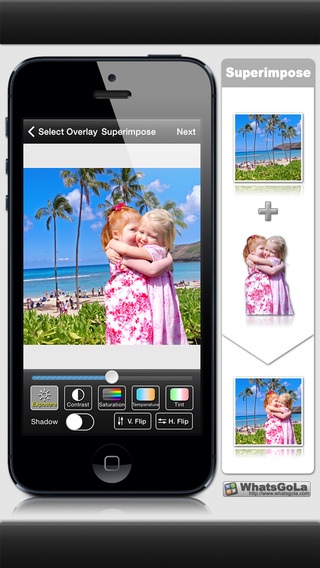
The superimpose tool is designed to let you merge a background image and a number of overlay images to make a lifelike superimposed picture:
- Add multiple overlay images to the background image.
- Adjust the exposure, contrast, saturation, temperature, or tinr for the overlay to balance the background.
- Rotate, zoom, or flip overlay images.
- Crop superimposed images freely or with preset aspect ratios.
- Apply 17 creative filters.
- Final superimposed picture is up to 1600 x 1600 pixels.
- Preserve the GPS geographic locations to the final pictures.
Overlay Management:
The overlay editor provides some handy tools to mask the photos. You can draw the alpha channel on the photo to keep the subject and remove the background:
- Create overlays and reuse them later.
- Adjustable brush/eraser size and hardness.
- Share overlay images.
Gallery:
The Gallery section works similar to the iPhone Photos App which lets you manage superimposed images.
- Show the information of the superimposed images: GPS location, approximate address and date of creation.
- Share the superimposed images by E-mail, or upload to Facebook/Twitter/Instagram.
- Save the superimposed images to the Photo Library with the GPS location preserved.
- Export the superimposed images to other Apps.
Support: support@whatsgola.com
Requires iOS 7.0 or later. Compatible with iPhone, iPad, and iPod touch.
About WhatsGoLa
The company that develops WhatsGoLa is CHE-WEI LIU. The latest version released by its developer is 2.8.
To install WhatsGoLa on your iOS device, just click the green Continue To App button above to start the installation process. The app is listed on our website since 2012-06-29 and was downloaded 0 times. We have already checked if the download link is safe, however for your own protection we recommend that you scan the downloaded app with your antivirus. Your antivirus may detect the WhatsGoLa as malware if the download link is broken.
How to install WhatsGoLa on your iOS device:
- Click on the Continue To App button on our website. This will redirect you to the App Store.
- Once the WhatsGoLa is shown in the iTunes listing of your iOS device, you can start its download and installation. Tap on the GET button to the right of the app to start downloading it.
- If you are not logged-in the iOS appstore app, you'll be prompted for your your Apple ID and/or password.
- After WhatsGoLa is downloaded, you'll see an INSTALL button to the right. Tap on it to start the actual installation of the iOS app.
- Once installation is finished you can tap on the OPEN button to start it. Its icon will also be added to your device home screen.
Program Details
System requirements
Download information
Pricing
Version History
version 2.8
posted on 2012-06-29
Disclaimer
Official App Store Link
We do not host WhatsGoLa on our servers. We did not scan it for viruses, adware, spyware or other type of malware. This app is hosted by Apple and passed their terms and conditions to be listed there. We recommend caution when installing it.
The App Store link for WhatsGoLa is provided to you by apps112.com without any warranties, representations or guarantees of any kind, so access it at your own risk.
If you have questions regarding this particular app contact the publisher directly. For questions about the functionalities of apps112.com contact us.
